Assigning Team Members to a Task in the Gantt Chart
|
4
Project managers can assign team members to tasks
in the Gantt chart. Team members are listed in the Sidebar, located on the right side of the Gantt chart. You can search for team
members by name.
Note: If a workspace
has been synchronized with a Microsoft Project file using ProjectTransit, the schedule is checked out and
you cannot add, edit, or delete a task in PPM.
When you assign a resource to a task, an icon displays next to the task to indicate there are resource assignments. Click the icon to see and change the resource allocations for each assigned resource.
To assign team members to a task:
- In the Gantt chart, open the Sidebar and expand the Resources list.
Note: The Sidebar and Resources list display by default. If you closed them they may not be visible. For information about using the Sidebar, see About the Gantt Chart Sidebar.
- Click a resource and drag them to the task to which you want to assign them:
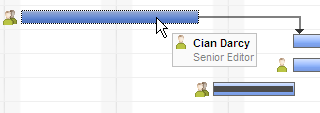
The team member is assigned to the task.
You can also assign team members to a task in the Task Grid, by typing a name in the Resource Names column. For more information about the Task Grid, see About the Gantt Task Grid.
Note: By default, 100% of a team
member's time is scheduled on a task when they are assigned to the task. You
can specify a different percentage of time for each assigned that team memberby change that percentage. For more information, see Changing
Resource Allocation Units (Effort).
Related
Topics: